By Syed Haider Ali Shah, Content Writer at ATS Resume OS · Published: 29 Oct 2026 · Last updated: 29 Oct 2026 · Reviewed against the live ATS Resume OS checker on 29 Oct 2026
Quick answer: To check if your resume is ATS friendly, upload it to a free ATS resume checker, read which checks fail (parsing, layout, contact details, sections, keywords), fix the critical ones first, and re-scan against the actual job description. Then do the 30-second "plain text test" below. If a machine can read your name, job titles, dates and skills in the right order, you are most of the way there.
This guide shows you exactly how to do that for free with the ATS Resume OS checker, what your ATS score really means, and how to fix the problems that get resumes filtered or misread.
Key takeaways
- An ATS (applicant tracking system) parses your resume into fields. If parsing fails, a recruiter may see a messy or empty profile.
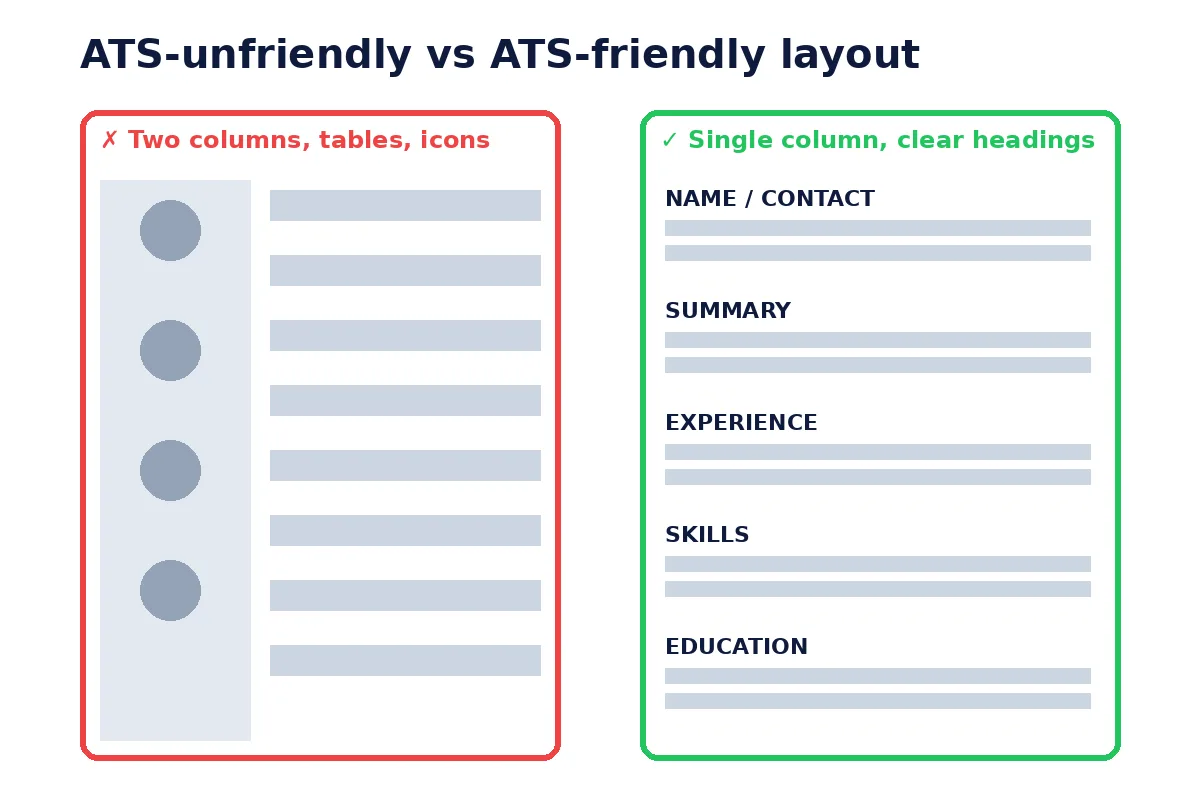
- The biggest risks are layout problems: tables, two columns, text boxes, images, and content in headers/footers.
- A "good" ATS score is not a pass mark set by employers. Each checker scores differently. Use it as a to-do list, not a grade.
- Match keywords to each job description using the employer's exact wording, but only for skills you really have.
- A clean, single-column DOCX or text-based PDF works for most systems. Follow the employer's instructions when they name a format.
- Re-check every time you edit. Small changes (a new template, a pasted icon) can break parsing.
What is an ATS, and how does it read your resume?
An applicant tracking system is software employers use to collect applications, store candidate profiles, and help recruiters search and filter them. Well-known systems include Workday, Greenhouse, Lever, iCIMS, Taleo (Oracle) and SuccessFactors (SAP).
When you upload a resume, most ATS tools do three things:
- Extract text from the file. A scanned image or a design-heavy PDF can come out as gibberish or nothing at all.
- Parse that text into fields: name, email, phone, location, job titles, employers, dates, education, skills.
- Let recruiters search and rank candidates, often by keywords, job titles, location, or knockout questions on the application form.
A common myth says "75% of resumes are rejected by ATS robots." We could not find a credible original source for that number, so we don't repeat it. What is documented: a Harvard Business School and Accenture study, "Hidden Workers: Untapped Talent" found that automated hiring systems often screen out qualified candidates on narrow criteria, such as gaps in employment or missing exact-match terms. The practical lesson is the same: make your resume easy to parse and clearly matched to the job.
Most rejections still come from humans. The ATS's real job is to put your information in front of a recruiter correctly. Your job is to make sure it does.
How to check if your resume is ATS friendly (step by step)
You can do this free in about five minutes. No account is needed on ATS Resume OS.
Step 1: Get the job description ready
Pick one real job you want. Copy the full posting. ATS friendliness has two parts: can the system read your resume, and does your resume match this job. You need the posting for the second part.
Step 2: Upload your resume to the free ATS resume checker
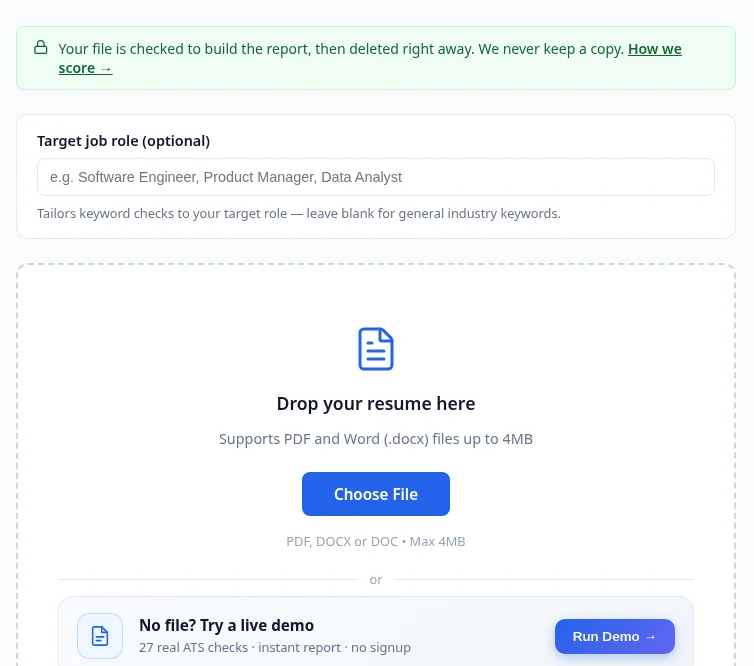
Go to the ATS Resume Checker. Optionally type your target job role; this tailors the keyword checks to that role (leave it blank for general industry keywords). Then upload your file. The checker accepts PDF, DOCX or DOC up to 4MB. No file handy? Click Run Demo to see a sample report first.
Privacy note: the site states your resume is parsed for your session and then deleted, not stored. See the Privacy Policy.
Step 3: Read your ATS score and the 27 checks
You get a 0–100 score and a list of 27 checks in five groups:
| Group | Checks | What it catches |
|---|---|---|
| Parseability | 5 | Unreadable/scanned files, tables, two-column layouts, text boxes, file size |
| Contact | 5 | Email, phone, LinkedIn URL, location, professional email address |
| Content | 10 | Summary, experience, education, skills, bullets, action verbs, numbers, dates, filler phrases, length |
| Keywords | 4 | Industry keywords, populated skills section, soft skills, certifications |
| Formatting | 3 | Font and layout basics |
Each check is labeled Critical, Important or Minor, and the How We Score page shows the points behind each one. That transparency matters: you can see why you lost points, not just a number.
Step 4: Fix critical issues first
Start with anything marked Critical: unreadable file, tables, two columns, missing email, missing work experience. These can stop the ATS from building your profile at all. Then fix Important items (skills section, action verbs, quantified results). Minor items come last.
Step 5: Match the job description
Paste the posting into the JD Matcher to see which requirements your resume covers, or use the JD Keyword Finder to pull out the terms the employer uses. Add the ones that are true for you (more on doing this without stuffing below).
Step 6: Re-scan and save the version
Upload the edited file again and compare. You can track snapshots in Score History so you know which version you sent to which company.
Our test: same resume, two layouts
On 29 Oct 2026 we ran a simple test on the live ATS Resume OS checker. We wrote one fictional sample resume and saved the same content in two layouts: a two-column PDF and a single-column PDF. We left the target job role blank.
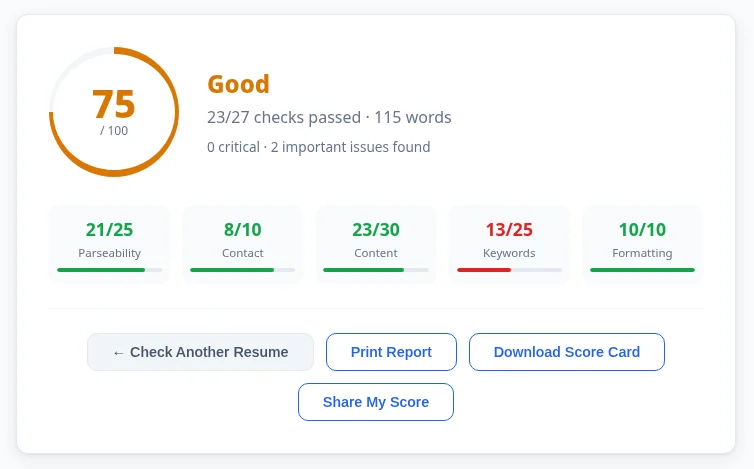
- Two-column PDF: 75/100 (Good), 23 of 27 checks passed. Parseability was 21/25. The checker flagged "No problematic text boxes" because the text came out as short, broken lines, which suggests text boxes or graphics.
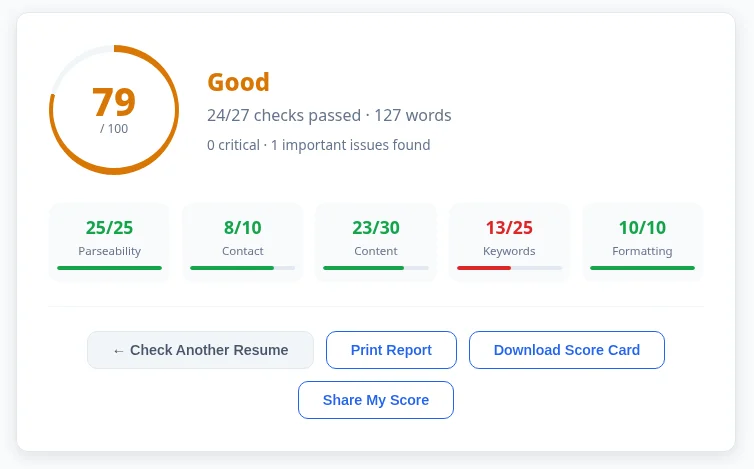
- Single-column PDF: 79/100 (Good), 24 of 27 checks passed. Parseability was a full 25/25.
- Every other group scored the same on both. Contact 8/10, Content 23/30, Keywords 13/25, Formatting 10/10.
- Both versions failed "Location mentioned". The sample only said "Austin, TX" with no country, so adding the country is an easy fix.
The only difference was the layout, and the layout alone cost 4 parseability points. This is a small test with one sample resume, not a study, but it matches the rule in this guide: use a single column.
Bonus: the 30-second plain text test
No tool can fully copy every ATS. So also do this:
- Open your PDF, press Ctrl+A (Cmd+A on Mac), copy, and paste into Notepad or TextEdit.
- Read it top to bottom.
If your name is missing, sections are jumbled, two columns are mixed line-by-line, or skills appear as odd symbols, an ATS will likely struggle too. Many competitor guides skip this, but it is the fastest real-world test you can run.
What is a good ATS score?
There is no universal ATS score. Employers' systems don't show you a number, and every checker (ours, Jobscan, Resume Worded, Enhancv) uses its own method. So "Is 74 a good ATS score?" depends on the tool.
A sensible way to read the ATS Resume OS score:
- Treat failed Critical checks as must-fix, whatever the total.
- Aim to pass every check that is true for your situation. For example, if you have no certifications, don't invent one to gain points.
- Aim higher on the job match than on the general score. A 90 on a generic scan means little if your resume misses the main skills in the posting.
The checker also gives your score a plain rating; in our test, both 75 and 79 were rated Good. See How We Score for how points are calculated. Our What Is an ATS Score guide explains the scale in more detail.
Also expect the score to move when you edit. That is normal, and we explain why in What Is an ATS Score.
Common reasons resumes fail ATS checks (and how to fix them)
| Problem | Why it hurts | Fix | |
|---|---|---|---|
| Two-column template | Parsers may read across columns, mixing lines | Use one column; put skills in their own section | |
| Tables or pipe characters ( \ | ) | Cells may be dropped or merged | Use plain lines and bullets |
| Text boxes, icons, graphics | Text inside may not be extracted | Type the text directly in the document body | |
| Contact info in header/footer | Some systems skip headers/footers | Put name, email, phone, city at the top of the body | |
| Scanned or image PDF | No text to extract | Export from Word/Google Docs as a text PDF | |
| Creative section names ("My Journey") | Parser can't map the section | Use "Work Experience," "Education," "Skills" | |
| Missing dates or mixed formats | Timeline can't be built | Use one format, e.g., "Jan 2024 – Mar 2026" | |
| Skills only in a chart or rating bar | Skill names may be lost | List skills as words | |
| Generic duties ("Responsible for…") | Weak match and weak for humans | Action verb + task + result with a number | |
| No job-specific keywords | Low match in recruiter searches | Mirror the posting's terms (honestly) |
See more in our Common ATS Mistakes guide.
ATS resume formatting rules
PDF vs DOCX. Most modern ATS can read both. A DOCX is the safest choice for older systems; a text-based PDF (exported, not scanned) keeps your layout fixed and works well with most current systems. Rule one: if the job posting asks for a format, use it. Always run the plain text test on PDFs.
Fonts. Use common fonts such as Calibri, Arial, Helvetica, Georgia or Times New Roman, at 10–12 pt for body text. Avoid decorative fonts and special symbols for bullets; a simple round bullet is fine.
Layout. One column, left-aligned, normal margins (0.5"–1"). No tables, text boxes or graphics for content.
Headers and footers. Keep critical information out of them. A page number in the footer is fine.
Section order. Contact → Summary → Work Experience → Skills → Education → Certifications (students and freshers can put Education before Experience).
File name. Use something clear like Firstname-Lastname-Resume.pdf.
Length. One page for early career, two for most experienced roles. The checker flags resumes outside roughly 400–900 words as a minor issue.
Need a clean starting point? Use the free Resume Builder or ATS-friendly resume templates. Full details are in our ATS Resume Format guide.
How to match keywords to a job description (without stuffing)
Recruiters often search an ATS for skills and job titles. That's why keyword matching matters. But stuffing (repeating words, hiding white text, pasting the whole posting) can backfire: modern systems and every human reader will notice.
Do this instead:
- Find the must-haves. Look for skills listed under "Requirements" and repeated more than once.
- Use the employer's exact wording. If the posting says "project management," don't only write "managed projects." If it says "SQL," write "SQL."
- Include both forms of acronyms once: "Search Engine Optimization (SEO)."
- Put keywords where they prove something. A skill in a bullet with a result ("Built SQL dashboards that cut reporting time by 30%") beats a skill in a list.
- Mirror the job title in your summary if it truly fits your experience.
- Only add what's true. You will be asked about it in the interview.
Our guides How to Match Your Resume to a Job Description and Match Your Resume to a Job Description go deeper.
Country notes: USA, India and the Philippines
USA. Use "resume," not CV. Leave out photo, date of birth, marital status and full street address; city and state are enough. Keep it to 1–2 pages. Many large US employers use systems such as Workday and Greenhouse, so clean parsing matters. Many applications also include knockout questions (work authorization, location), so answer those carefully.
India. Job portals like Naukri and LinkedIn, plus company career sites, all parse uploaded resumes. Freshers should lead with education, projects, internships and skills. Personal details like date of birth or a photo are common locally but usually unnecessary; include them only if the employer asks. For large campus and IT services hiring, make sure your degree, graduation year and percentage/CGPA are written as plain text.
Philippines. "CV" and "resume" are both used. Local employers sometimes expect a photo and personal details, but international and BPO employers usually prefer a clean, ATS-friendly resume without them. Follow the posting. For BPO, virtual assistant and healthcare roles, list tools (e.g., Zendesk, Salesforce), typing speed or certifications as plain text, and state your shift availability if the job mentions it.
ATS-friendly resume checklist
- Single column, no tables, text boxes, icons or images
- Name, email, phone, city and LinkedIn in the body, not the header
- Standard section headings: Summary, Work Experience, Skills, Education
- Consistent date format on every role
- Standard font, 10–12 pt
- DOCX or text-based PDF (passes the plain text test)
- Keywords from the job description used naturally and honestly
- Bullets start with action verbs; achievements include numbers
- No "Responsible for…" filler
- Clear file name
- Scanned with a free ATS resume checker and Critical checks passed
- Saved a tailored version for this job
FAQ
How do I check if my resume is ATS friendly for free? Upload it to a free ATS resume checker like ATS Resume OS, fix the failed checks, then do the copy-paste plain text test. No signup is needed.
What is a good ATS score? There's no official standard; each tool scores differently. Pass all Critical checks, then focus on matching the specific job description.
Is PDF or Word better for ATS? Both work in most modern systems. DOCX is safest for older systems; a text-based PDF is fine for most others. Use the employer's requested format if stated.
Can an ATS read two-column resumes? Some can, many misread them. A single column is the safest choice.
Is an ATS resume scanner the same as the employer's ATS? No. A scanner simulates common parsing and keyword rules. It can't copy every employer's system, but it catches the issues that most often cause problems.
Should I put keywords in white text to beat the ATS? No. Hidden text can be seen when recruiters view the parsed text, and it can hurt your credibility.
How often should I check my resume? Every time you change the template or tailor it for a new job.
Is my resume stored when I use ATS Resume OS? The site states files are parsed for your session and then deleted. See the Privacy Policy.
Check your resume now
You now know what ATS software looks for and how to fix it. The fastest next step: [run your resume through the free ATS Resume Checker](https://atsresumeos.com/ats-resume-checker). It's 27 checks, unlimited scans, and no account required. Then tailor it with the JD Matcher before you hit Apply.

About the author: Syed Haider Ali Shah is a content writer at ATS Resume OS, where he writes guides on ATS-friendly resumes and tests them with the ATS Resume OS checker. Sources: HBS/Accenture "Hidden Workers" (2021); [Indeed Career Guide on ATS resumes](https://www.indeed.com/career-advice/resumes-cover-letters/ats-resume-template); ATS Resume OS [methodology](https://atsresumeos.com/methodology).